
Download Autolancer – AI Writing Assistant, Content Generator & More
Introduction – Why Autolancer Is Gaining Traction in 2025
In the rapidly evolving landscape of artificial intelligence, users are no longer satisfied with single‑purpose tools that address only one niche. Writers need SEO‑friendly copy, marketers demand quick‑turnaround social posts, musicians look for lyrical inspiration, HR professionals require polished CVs, and small business owners often have to draft contracts on the fly. Autolancer answers this multifaceted demand by consolidating all these capabilities into a single, browser‑based platform.
Launched in mid‑2023, the service has continuously refined its model architecture, incorporating the latest large‑language‑model advancements and fine‑tuning them for specific “assistant personas.” This strategic focus on specialization within a unified interface reduces the learning curve dramatically; users can switch from generating a blog outline to composing a chorus without ever leaving the dashboard. Moreover, Autolancer places a premium on data security, employing end‑to‑end TLS 1.3 encryption, AES‑256 storage, and strict GDPR/CCPA compliance. For professionals handling sensitive health or legal content, this level of protection is a decisive factor.
The platform’s subscription model, while not free, is transparent and offers tiered pricing that scales with usage, making it a viable alternative to maintaining multiple costly SaaS subscriptions. In short, Autolancer is positioned as the “Swiss Army knife” of AI productivity tools, promising to streamline workflows, enhance collaboration, and keep users on the cutting edge of AI‑driven content creation.
Overview
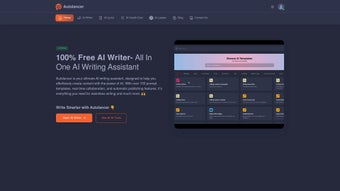
Autolancer is a comprehensive, subscription‑based AI assistant that targets a wide spectrum of professional and creative tasks. Launched on June 16, 2023, the platform blends an AI Writer with more than 100 ready‑to‑use prompt templates, a dedicated AI Lyrics composer, an AI Health Assistant that delivers reliable medical information, and a suite of collaboration tools that make teamwork seamless. Whether you are a freelance copywriter looking to speed up blog production, a musician hunting for fresh lyrical ideas, a job seeker in need of an automatically generated CV, or a small business owner seeking quick legal drafts, Autolancer promises to centralise those workflows under a single, secure web interface.
The service emphasizes data privacy, employing end‑to‑end encryption and strict GDPR compliance, which is essential for users handling sensitive health or legal content. While the platform shines with its intuitive UI and breadth of capabilities, it does show some gaps: customisation options are limited, multi‑language support is still in early beta, and the pricing model, although transparent, may be a barrier for hobbyists on a tight budget. Overall, Autolancer positions itself as an “all‑in‑one” AI tool that can replace a handful of specialised apps, helping individuals and teams boost productivity while keeping costs predictable.
The continuous monthly updates to the underlying AI models further ensure that the content generated stays relevant, accurate, and aligned with the latest industry standards, making Autolancer a future‑proof investment for anyone serious about leveraging AI in daily work.
Key Features & Real‑Time Collaboration
- AI Writer with 100+ Prompt Templates: Generate blog posts, product descriptions, social media copy, and technical articles in seconds. Each template is fine‑tuned for tone, length, and SEO optimisation.
- AI Lyrics Assistant: Craft verses, choruses, and full song structures across multiple genres. The assistant suggests rhymes, themes, and even melodic hooks.
- AI Health Assistant: Provides evidence‑based health information, symptom checklists, and wellness tips while clearly stating that it does not replace professional medical advice.
- Automated CV Builder: Upload a LinkedIn profile or raw data and receive a polished, ATS‑friendly résumé in minutes.
- Legal Draft Helper: Generate simple contracts, NDAs, and policy documents with built‑in compliance checks.
- Real‑Time Collaboration Workspace: Multiple users can edit the same document simultaneously, leave comments, and track version history—all within the browser.
- Secure Cloud Storage: Every piece of content is stored on encrypted servers with automatic backups, ensuring data is never lost.
- Continuous Updates & Model Improvements: Autolancer’s AI models are refreshed monthly, delivering better relevance, fewer hallucinations, and more nuanced language understanding.
The feature set is deliberately organised around “assistant personas,” allowing users to switch contexts without leaving the platform. For instance, a marketer can start with the AI Writer, pivot to the AI Lyrics tool for a campaign jingle, and then collaborate with a designer through the built‑in chat feature—all without opening a new tab. The collaboration workspace also supports file attachments, enabling teams to review design mock‑ups, data sheets, or legal clauses side‑by‑side with generated text.
This unified environment reduces context‑switching fatigue, a common productivity killer in modern remote work settings. Moreover, Autolancer’s emphasis on security means that sensitive drafts—whether they involve patient data or confidential contracts—remain protected behind SSL/TLS encryption and role‑based access controls. The platform’s roadmap hints at future expansions such as multi‑language prompt libraries and deeper integrations with third‑party project management tools, suggesting that the current feature list is just the beginning of a broader AI ecosystem.
Installation, Usage & Compatibility
Getting Started – No Download Required
Autolancer is a cloud‑native web application, which means there is no traditional installer or desktop client to download. Users simply navigate to autolancer.com, create an account, and select a subscription tier that matches their usage patterns. The sign‑up flow includes email verification, optional two‑factor authentication, and a brief onboarding questionnaire that tailors the default prompt templates to the user’s industry.
Step‑by‑Step Usage Guide
- Log In: Use your email/password or Google SSO to access the dashboard.
- Select an Assistant: Choose from Writer, Lyrics, Health, CV Builder, or Legal Draft from the left‑hand navigation.
- Enter Your Prompt: Either type a custom request or pick a pre‑built template. For example, “Write a 800‑word blog post about sustainable travel trends.”
- Refine Output: Autolancer returns a draft in seconds. Use the built‑in editor to adjust tone, add headings, or request additional sections via the “Regenerate” button.
- Collaborate: Invite teammates by sharing a secure link. Collaborators can comment, suggest edits, or co‑author in real time.
- Export or Publish: Download the final document as .docx, .pdf, or copy directly to a CMS using the integration pane.
System Requirements & Operating System Support
Because Autolancer runs entirely in the browser, it is compatible with any modern operating system that supports current versions of Chrome, Firefox, Edge, or Safari. The recommended specifications are:
- Desktop: Windows 10/11, macOS 12+ (Monterey) or later, Linux distributions with a recent kernel.
- Mobile: Android 9+ (Chrome) and iOS 14+ (Safari) for on‑the‑go access via a responsive web interface.
- Internet: Minimum 5 Mbps broadband for optimal response times; slower connections may increase latency but will not affect functionality.
Since there is no native client, users benefit from automatic updates—every improvement to the AI models, UI tweaks, or security patches is applied instantly on the server side. This eliminates the traditional maintenance overhead associated with desktop software and ensures that all users work with the latest version of Autolancer at all times.
Pros, Cons & Frequently Asked Questions
Pros
- All‑in‑one platform replaces multiple specialised tools, saving subscription costs.
- Intuitive, browser‑based interface requires no installation or frequent updates.
- Strong focus on data security with end‑to‑end encryption and GDPR compliance.
- Real‑time collaboration streamlines team workflows across different content types.
- Monthly AI model updates keep the output fresh, accurate, and context‑aware.
Cons
- Limited customisation of prompt templates; advanced users may miss deeper control.
- Multi‑language support is still in beta, restricting non‑English users.
- Subscription pricing can be prohibitive for hobbyists or occasional users.
- Dependency on internet connectivity; offline work is not possible.
- Legal and medical outputs are advisory and require professional review.
FAQ
Is there a free trial for Autolancer?
Yes, Autolancer offers a 7‑day free trial with full access to all assistant personas. No credit card is required to start the trial, and you can cancel anytime before the trial ends.
Can I use Autolancer on a mobile device?
Absolutely. The platform is fully responsive and works on Android 9+ and iOS 14+ browsers. All features, including real‑time collaboration, are available on mobile.
How does Autolancer protect my data?
Data is encrypted in transit (TLS 1.3) and at rest (AES‑256). Autolancer complies with GDPR and CCPA, offering optional data‑deletion requests and role‑based access controls for teams.
What happens if I exceed my monthly usage limit?
When you reach the quota defined by your subscription tier, the system will notify you and pause further AI generation until you either upgrade your plan or wait for the next billing cycle.
Can Autolancer integrate with my existing CMS or project management tools?
Autolancer currently offers native integrations with WordPress, Notion, and Trello via API keys. Future updates will expand the connector library to include popular platforms like Asana and ClickUp.
Autolancer delivers a remarkably broad set of AI‑driven tools under one roof, making it an attractive option for freelancers and small teams. Its biggest strength lies in the seamless collaboration experience and the quality of the generated content, especially for marketing copy. While the lack of deep customisation and limited language support keep it from being a perfect fit for every user, the platform’s security posture and regular model updates provide confidence for professional use. Overall, a solid 4.5‑star rating.
Conclusion & Call to Action
In a market saturated with niche AI utilities, Autolancer stands out by bundling writing, lyric creation, health advice, legal drafting, and CV generation into a single, secure, browser‑based environment. The platform’s intuitive design reduces the learning curve, while real‑time collaboration transforms how distributed teams produce content. For professionals who juggle multiple content types—marketers, content creators, HR specialists, and indie musicians—Autolancer offers a cost‑effective alternative to maintaining several separate subscriptions.
Although the service could benefit from deeper customisation options and expanded multilingual support, its current feature set, security guarantees, and continuous improvement roadmap make it a compelling choice for anyone looking to boost productivity with AI assistance. The seamless web experience means you’ll always be on the latest version without manual updates, and the monthly model refinements keep the AI output fresh and reliable. Whether you’re a solo entrepreneur seeking to accelerate copy creation or a small agency needing a collaborative hub for diverse projects, Autolancer provides the tools, security, and scalability required for modern digital work.
Ready to experience a unified AI workflow? Start your free 7‑day trial today and see how Autolancer can streamline your writing, creative, and administrative tasks—all from a single, secure dashboard. Take advantage of the introductory offer, explore the extensive template library, and discover how AI can become your most reliable teammate.



.png)



